How to use BetTheDrop, step by step
Everything you need to set it up on your own: what to press, where the button is and what you should see. About 10 minutes from sign-up to your first checked alert.
Watch it first
A one-minute tour of the app. Then follow the steps below at your own pace.
See what our app looks like inside, and how it works
01Create your account and start the free trial
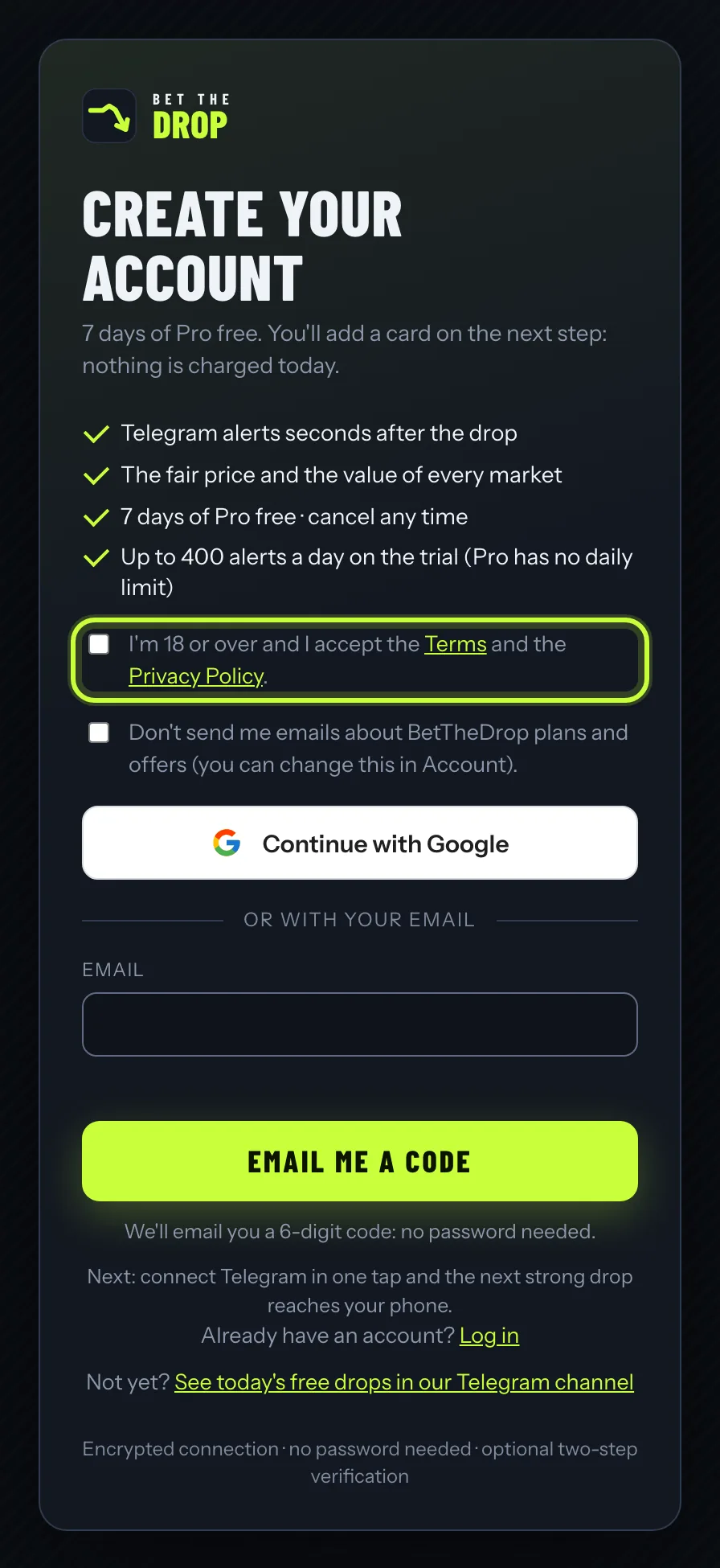
Press the free-trial button on any page of the website (there's one at the end of this guide). It opens the Create your account screen.
- Tick I'm 18 or over and I accept the Terms and the Privacy Policy. Without it you can't go on.
- Press Continue with Google, or type your email and press Email me a code. We send you a 6-digit code: type it and press Continue. No password needed.
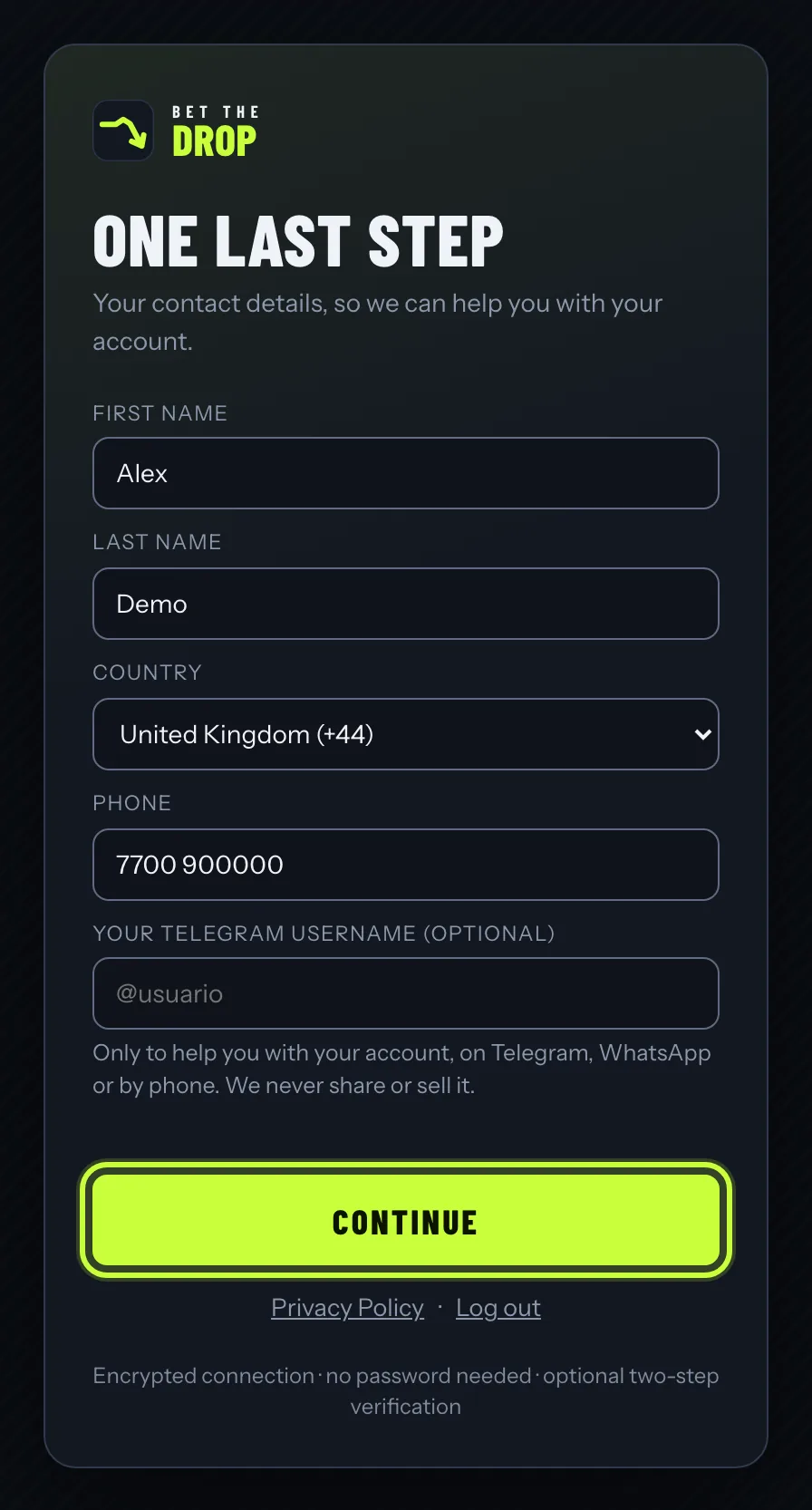
- On One last step, fill in your first name, last name, country and phone (your Telegram username is optional) and press Continue. It's only to help you with your account: we never share or sell it.
- You go to Stripe's secure payment page to start your 7-day Pro trial. You add a card, but nothing is charged today: the first payment arrives when the trial ends, unless you cancel before.
- Back in the app, answer Four quick questions (10 seconds). Then press Read the guide or Skip the guide: you'll always have it in the Guide tab.
You're in the app, with a lime Pro trial badge at the top that shows the days you have left.
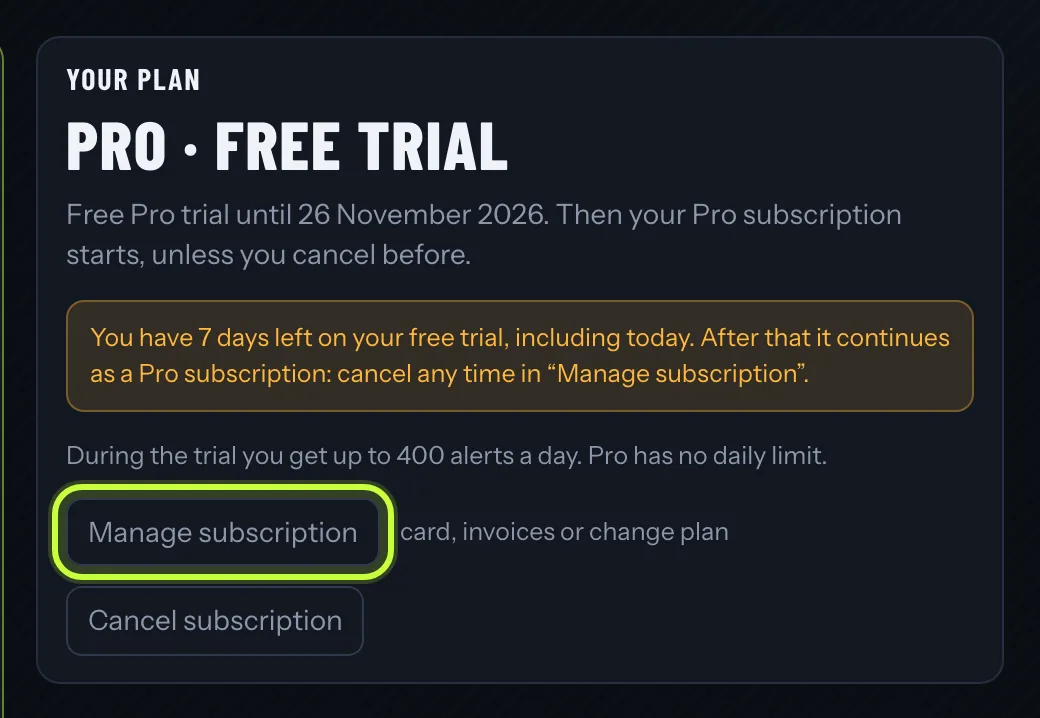
Want to cancel before paying anything? Account → Your plan → Cancel subscription, or Manage subscription (it opens Stripe). Cancel before the trial ends and nothing is charged.
- The code doesn't arrive? Look in spam or promotions, or press Send a new code.
- The Google button does nothing? Some apps (Telegram, Instagram) don't allow it inside them: open the page in Safari or Chrome.
- One free trial per person. A Telegram that already had a trial won't start another one with a new account: log in to the first one.
02Connect Telegram
Alerts reach you in a private chat with the BetTheDrop bot, one bet per message. It takes two taps.
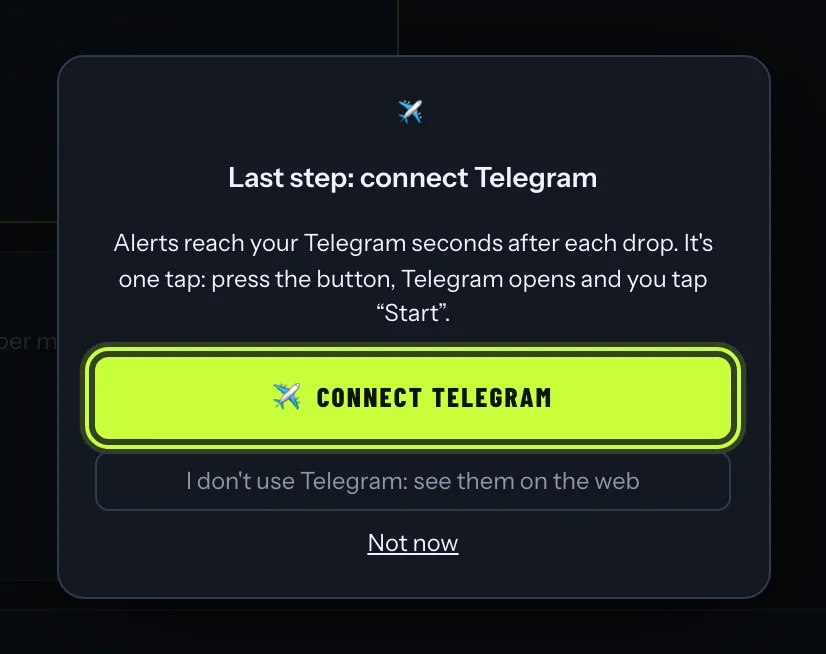
- Press Connect Telegram. You'll find it in the Last step: connect Telegram window and in Account → Telegram alerts.
- Telegram opens with the BetTheDrop bot. Press Start. The link lasts 15 minutes: if it has expired, press Connect Telegram again.
- Go back to BetTheDrop: the page updates by itself.
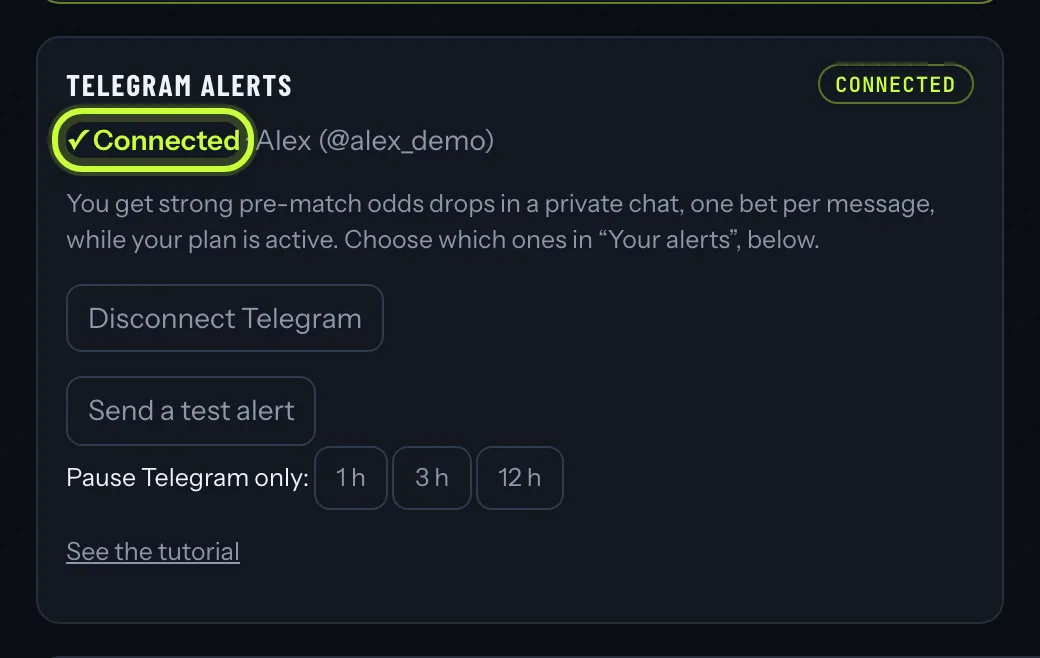
Account → Telegram alerts says ✓ Connected with your Telegram name. In Telegram the bot says Telegram is connected, sends you a sample alert marked Sample alert (not a real bet) and asks which bookmaker you use (you can ignore that).
👋 Hi Alex, Telegram is connected to your account (alex).
You're on the Pro trial: 6 days left, up to 400 alerts a day.
How it works:
1. A sharp drop happens and you get one bet per message.
2. Tap 📊 Check & track and type your bookmaker's price.
3. Bet only if it says VALUE. If it says NO VALUE, skip it.
…
18:02 ✓✓- No Telegram? Account → Alerts on this device → Turn on for this device: the same alerts pop up on your phone or computer, even with the site closed. On iPhone, first add the site to your home screen (Safari → Share → Add to Home Screen).
- Want to check it works? Account → Telegram alerts → Send a test alert.
- Blocked the bot or deleted the chat? Connect it again from Account.
The free channel
Not ready for an account yet? Our public channel @betthedrop_free posts a free sample of drops. It's only a sample: your own filters, the fair-price check and tracking are in the app.
03Choose which alerts you get
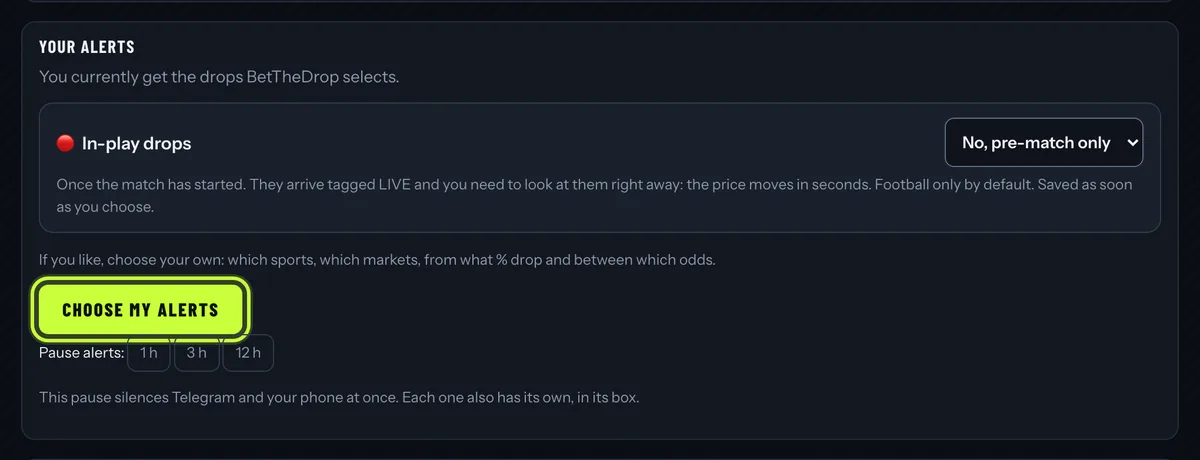
Everything is in Account → Your alerts. If you don't change anything, you get BetTheDrop's selection: that's the normal setup.
Our recommendation to start: keep the default selection for the first days, set your bankroll in Account → Bankroll & stake so every alert suggests a stake, and leave in-play drops off until you're used to it. If you get too many, pick a setup with fewer alerts instead of disconnecting the bot.
Fewer alerts in three taps
- Press Choose my alerts.
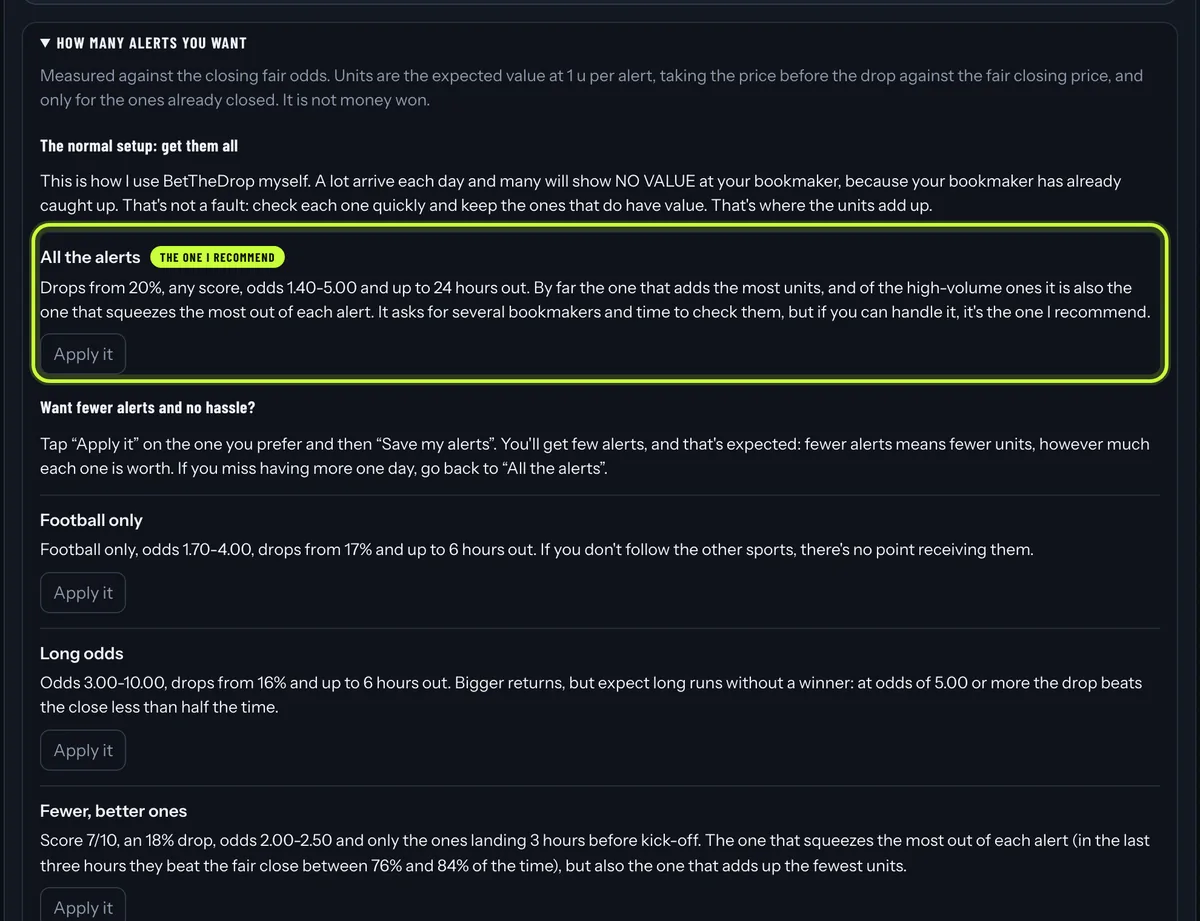
- Open How many alerts you want. Each setup explains what it sends you: All the alerts (the one we recommend), Football only, Long odds, Fewer, better ones and Favourites only. Press Apply it on the one you want.
- Press Save my alerts. Nothing changes until you save.
Or fine-tune it yourself
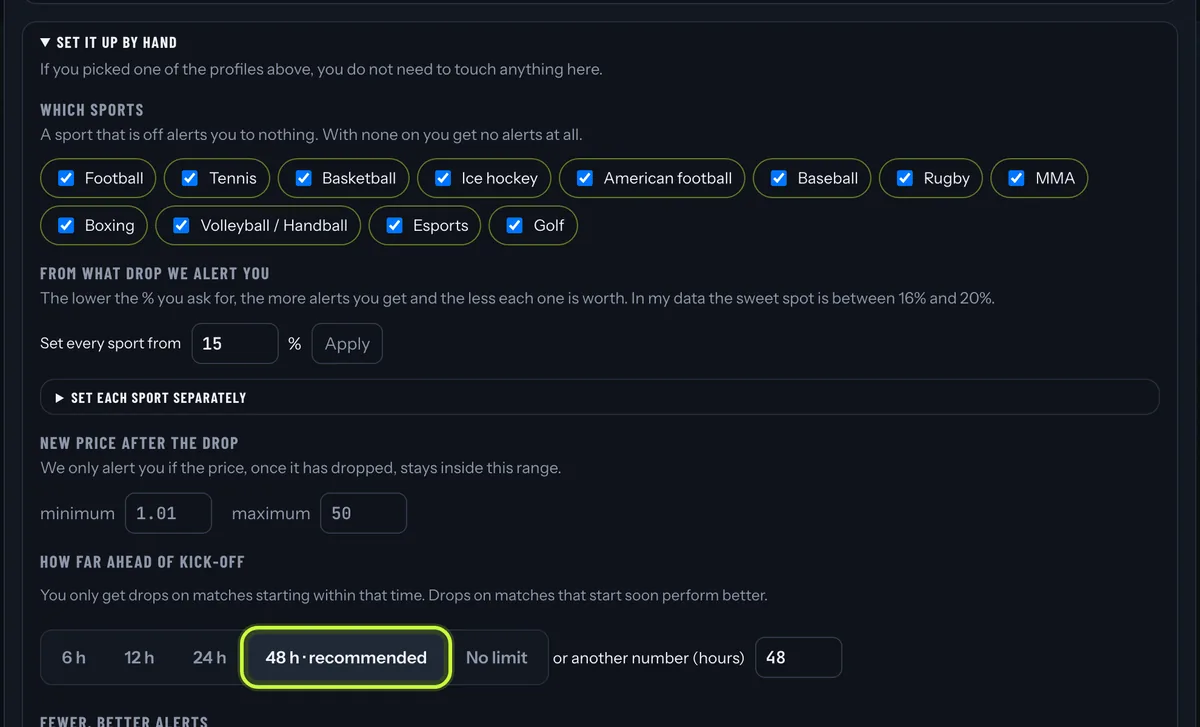
Under Set it up by hand:
- Which sports: a sport that is off sends you nothing.
- From what drop we alert you: the minimum drop in %. Lower means more alerts and less value in each one; the app suggests between 16% and 20%.
- Set each sport separately: one % for the full match and another for periods (halves, sets, quarters), and which markets: Winner, Handicap, Total and Team total.
- New price after the drop: the odds range (minimum and maximum) the price must stay in.
- How far ahead of kick-off: 6 h, 12 h, 24 h, 48 h (recommended) or no limit.
- Fewer, better alerts: minimum score (all, 7/10 or higher, 10/10 only), liquid markets only, competitions and the leagues your bookmaker offers.
In-play drops are off by default. To get them: Account → Your alerts → In-play drops → Yes, from 15% (it saves by itself). They arrive marked LIVE with the minute and the score, and the price moves in seconds: act straight away. Football only by default.
Pause without disconnecting anything: Account → Your alerts → Pause alerts for 1 h, 3 h or 12 h. In Telegram, /pause and /resume do the same.
Before you save, the editor tells you how many alerts those filters would have sent you in the last 7 days.
- Too few alerts? Very strict filters (few sports, 10/10 only, few hours before kick-off, liquid markets only) leave almost nothing. Go back to All the alerts.
- On the free trial there is a cap of 400 alerts a day. Pro has no daily limit.
04Read an alert
Each Telegram message is one bet. This is the sample alert the bot sends you when you connect, line by line:
🧪 Sample alert (not a real bet)
📉 BIG DROP −17% · 10/10
🟡 Medium liquidity · limit $350
🏐 Volleyball · Sultanlar Ligi
🆚 Match: Galatasaray – Nilufer
🕒 today 18:30 (in 2 h 10 min)
📌 Market: Handicap (points) · 1st set
🎯 Selection: Galatasaray −3.5
Reference: 2.31 → 1.92
✅ FAIR PRICE 1.97
💰 Value if your bookmaker pays more than 1.97
+3% from 2.03 · +5% from 2.07 · +10% from 2.17
💵 Your stake (bankroll €1,000): 2.03 → €0 · 2.07 → €10 · 2.17 → €15
18:02 ✓✓- 📉 BIG DROP −17% · 10/10
- The type of move, how far the reference price has dropped and its score from 0 to 10: 10 = big drop, the limit goes up or the market closed; 7 = steady drop; 3 = rebound.
- 🟡 Medium liquidity · limit $350
- The market limit: the money the reference market accepts on that line. 🟢 $1,000 or more, 🟡 $300-999, 🔴 under $300. The higher it is, the more you can trust the fair price.
- 🏐 Volleyball · 🆚 Match · 🕒
- Sport, competition, match and kick-off in your time zone.
- 📌 Market: Handicap (points) · 1st set
- The market and the period. The period matters: the 1st set is not the full match.
- 🎯 Selection: Galatasaray −3.5
- The exact bet to look for at your bookmaker, with its line. −3.5 and −4 are different bets.
- Reference: 2.31 → 1.92
- The reference price before and after the drop. That's the move, not the price you need.
- ✅ FAIR PRICE 1.97
- The reference price without its margin. There's value only if your bookmaker pays more.
- +3% from 2.03 · +5% from 2.07 · +10% from 2.17
- The minimum odds ladder: from which price you get +3%, +5% or +10% expected value.
- 💵 Your stake
- How much to stake with your bankroll and method (Account → Bankroll & stake).
Real alerts also bring 📡 Now: for 30 minutes the alert updates itself with the current price and fair price. Decide with those numbers, not the first ones. Below each alert: 📊 Check & track on BetTheDrop, 🔕 Mute match (no more drops from that match for 48 h) and ⏸ Pause 1 h.
The one rule: there's value only if your bookmaker pays more than the fair price. A big drop alone isn't enough.
05Check the value in the app
- In the alert, tap 📊 Check & track on BetTheDrop. The app opens with that exact match and selection already chosen. (You can also open Markets, pick a match and tap a price.)
- Look at the box You have value if your bookmaker pays: it's the minimum price, with the current fair price.
- Type your bookmaker's price in Your odds (your bookmaker's).
- Read the verdict: VALUE with the expected value (EV) in %, or NO VALUE.
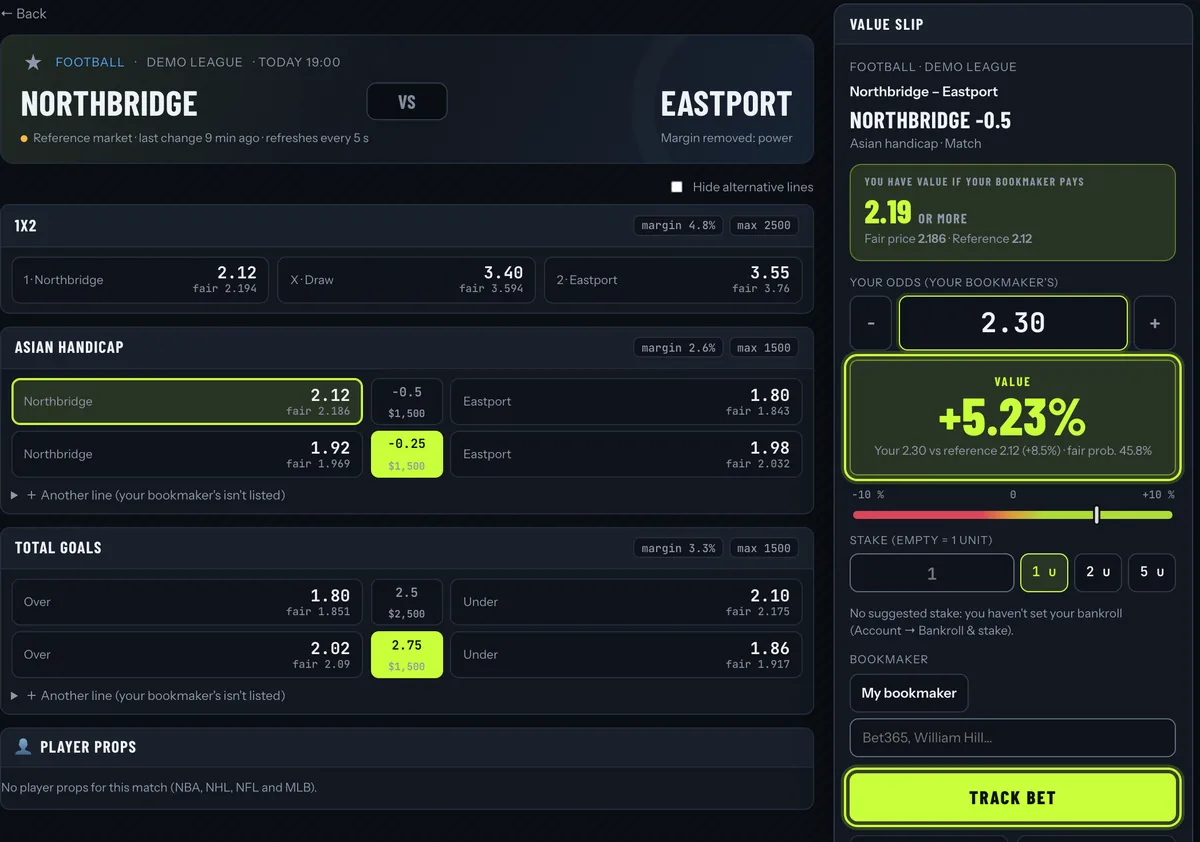
With a price above the fair one you see VALUE and a positive %. In the example, 2.30 against 2.186 gives +5.23%.
- Your bookmaker doesn't have that exact line? Use + Another line (your bookmaker's isn't listed): the app estimates its fair price from the neighbouring lines.
- NO VALUE is a useful answer: your bookmaker has already caught up. Let it go, there will be others.
- No alert at hand? Type a team, player or league in the search box at the top of the app.
06Track the bet and watch your CLV
- If you place the bet, set the stake (empty = 1 unit) and your bookmaker, and press Track bet. A message confirms it: Tracked · EV …
- Open My bets. Each bet shows your odds, the fair price, the EV, the close (or now) price and its CLV.
- Bets settle themselves with the official score when the match ends. If one doesn't, mark it with ✓ (won), ✗ (lost) or ↺ (void).
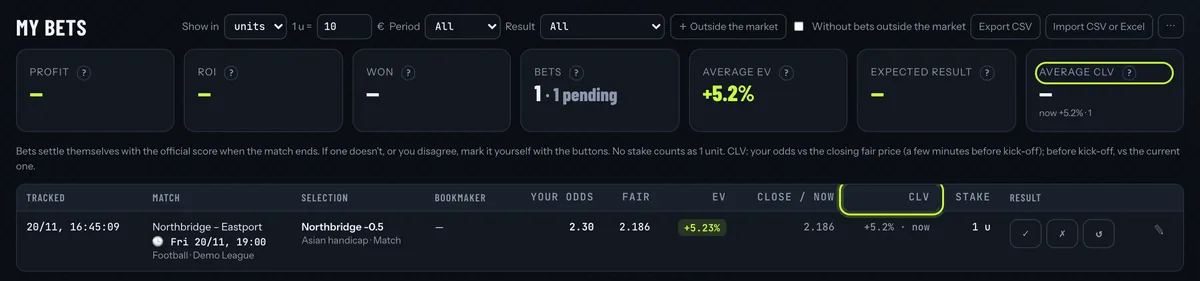
CLV compares your price with the fair closing price, a few minutes before kick-off. Before kick-off you see it against the current fair price (“now”). An average CLV above zero over many bets means you get better prices than the market; it doesn't guarantee profit.
You can show everything in units, € or $, filter by period and result, and export or import a CSV.
07See the public results and measure yourself
Alert results shows every alert of the last 30 days measured against the reference market's fair closing price: none are left out, and it updates every hour.
It measures the price before the drop, not the price you got. Your real edge is your own CLV in My bets: compare the two, and judge after around 100 bets, not after one week.
Expected value isn't winnings: individual bets vary a lot and you can lose money even on +EV bets. Past results don't guarantee future ones.
08Use NBA Stats
- In the app, press the NBA Stats tab. The NBA section opens in the same window.
- Search a player or team at the top, or use the side menu: Games, Injuries, Pick of the day, Props, Streaks, Odds, Player analysis, Leaders, Teams, Matchups and Favourites.
- To return, press Back to the app at the top.

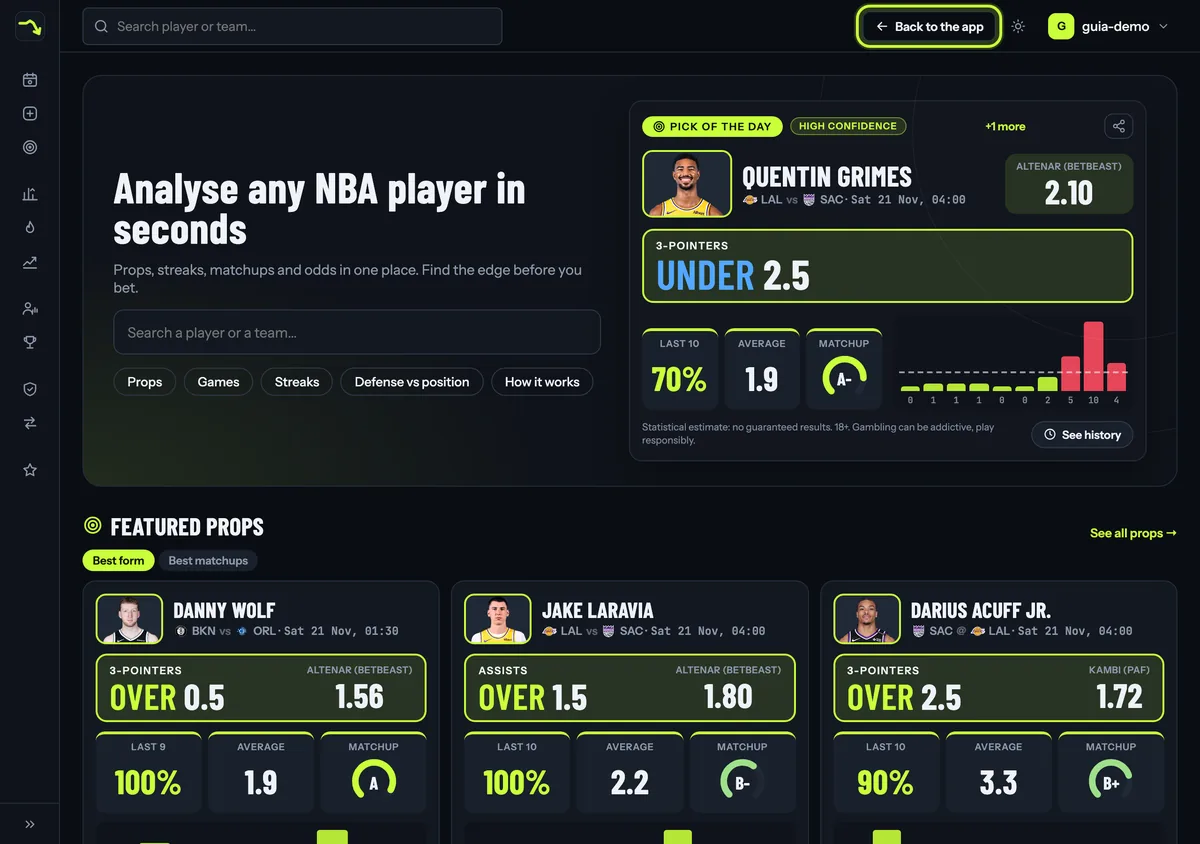
- Free with any account (after a short contact form): player stats (points, rebounds, assists, steals, blocks, field goals, 3-pointers and minutes), teams, games, leaders and injuries.
- With the NBA Props or Pro plan (the Pro trial opens all of it): props with their odds, the pick of the day, streaks, matchups and defence by position, shooting percentages and advanced stats.
The pick of the day is our model's statistical estimate: it shows the line, the odds and the player's recent record. It doesn't guarantee results.
- You see a form instead of the stats? Fill in your name, country and phone once to open the free version.
- A section is locked? It's part of NBA Props or Pro.
09Manage your account
- Change plan, card or invoices: Account → Your plan → Manage subscription. It opens Stripe's secure portal.
- Cancel: Account → Your plan → Cancel subscription. We ask why (optional) and show you alternatives; press Cancel anyway to confirm. You keep access until the end of the period you paid; payments aren't refunded.
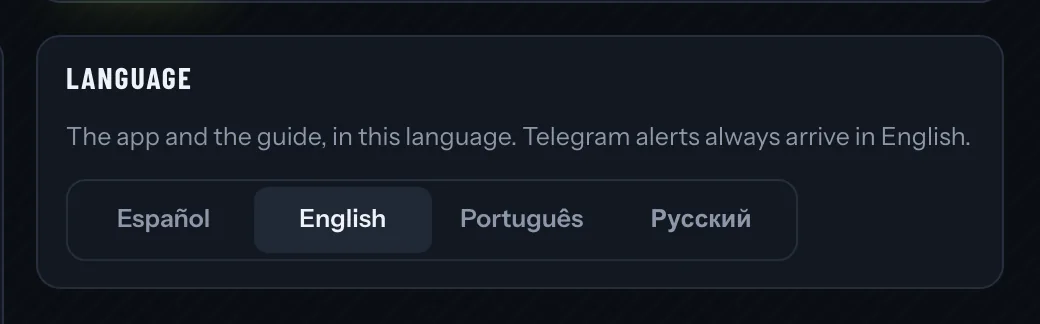
- Language: Account → Language: Español, English, Português or Русский. Telegram alerts always arrive in English.
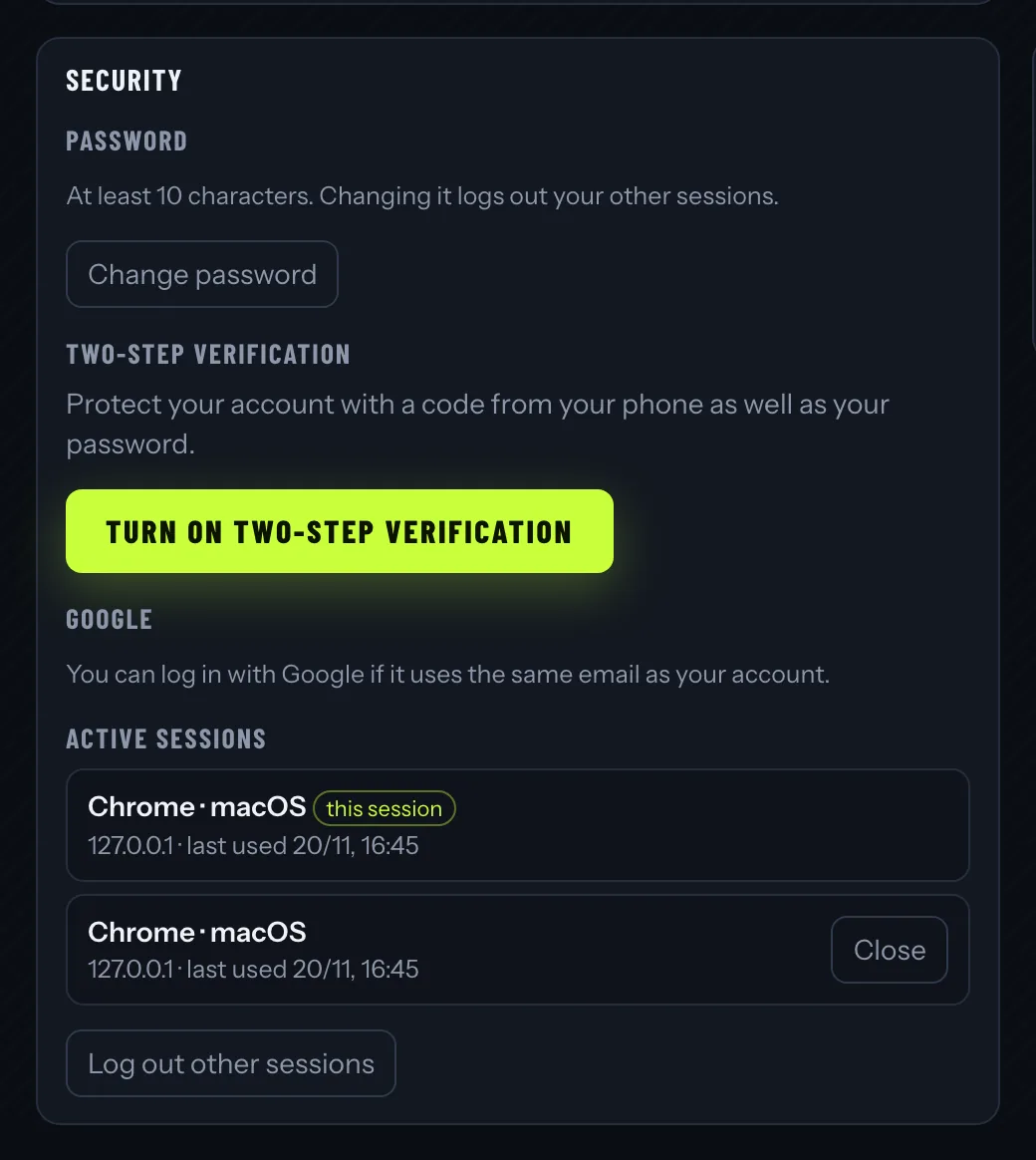
- Two-step verification: Account → Security → Turn on two-step verification and scan the code with an authenticator app. Keep the recovery codes somewhere safe.
- Disconnect Telegram: Account → Telegram alerts → Disconnect Telegram (or send /stop to the bot). To stop them for a while, pause instead.
- Your data: Account → Your data → Download my data or Delete my account.
10Setup questions and help
I'm not getting any alerts. What do I check?
Check, in this order: Account → Telegram alerts says Connected; you haven't blocked the bot or deleted the chat; you're not paused (send /resume to the bot); your filters aren't too strict; you haven't muted that match (Account → Unmute all); and, on the trial, the cap of 400 alerts a day. Drops come in bursts: sometimes minutes apart, sometimes more than an hour.
Why do so many alerts say NO VALUE at my bookmaker?
Because your bookmaker has already copied the move. That's normal: check each one quickly and keep the ones with value. Slow bookmakers are the ones that give value; very sharp ones and exchanges rarely do.
Do I need Telegram?
No. In Account → Alerts on this device, press Turn on for this device and the same alerts pop up on your phone or computer. You can have both.
How do I get fewer alerts?
Account → Your alerts → Choose my alerts → How many alerts you want → Apply it → Save my alerts. Fewer alerts also means fewer units over time.
Can I get alerts during matches?
Yes: Account → Your alerts → In-play drops → Yes, from 15%. They're off by default and football only by default.
Will I be charged when the trial ends?
Only if you don't cancel. The trial lasts 7 days and nothing is charged today. To stop it, go to Account → Your plan → Cancel subscription before it ends. After that you can cancel any time and keep access until the end of the period you paid; payments aren't refunded.
Which bookmakers can I use?
Any bookmaker: you type its price and BetTheDrop compares it with the fair price. If you win, some bookmakers limit your account, so spread your bets across several.
Can I use my account on several devices?
Yes, on a few at a time, and you can see and close them in Account → Security → Active sessions. Don't share your account.
Still stuck?
Don't write to the alerts bot: messages there aren't read. Instead, message Rubén, the founder, on Telegram at @Ruruu13 (he replies himself), or email support@betthedrop.com, or use the questions page.
Inside the app there's also an interactive guide (the Guide tab) with a quiz and a calculator to practise.
18+ only. BetTheDrop is odds analysis software: it doesn't take bets or guarantee profits, and betting involves risk. Bet only what you can afford to lose. Responsible gambling.
Download the short guide (PDF)